Buy 3 get the cheapest free
Reward baskets of three or more items from a category.
Cheapest item free
Make the cheapest qualifying product in the cart free or discounted, for deals like buy 3 get the cheapest free.
What it is
The Discount the cheapest product reward option applies the discount to the lowest priced item from the customer's own purchase instead of adding a separate gift product. A dedicated Shopify Function handles the cheapest-product logic at checkout.
Use it for multi-buy deals where you do not want to name a gift. It pairs well with cart quantity conditions such as buy 3 items from a collection.
For the shopper
Scroll through the steps. The phone shows what the shopper sees at each one; products and prices are an example.
The cart fills with products that match the offer.
The quantity or spend reaches the target.
The discount is applied to the lowest priced qualifying item.
The cart and checkout show the discounted price on that item.
For you
Options you control
Go to Offers, Create offer, Free Gift, and choose Manually or a template.
On the Condition step choose Cart quantity and set the minimum, and choose what items count.
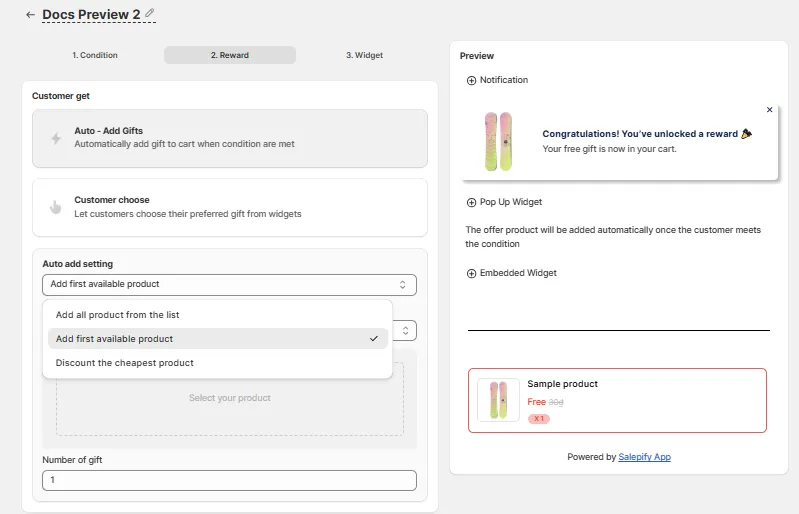
On the Reward step under Auto-add gifts option choose Discount the cheapest product from customer's purchase.
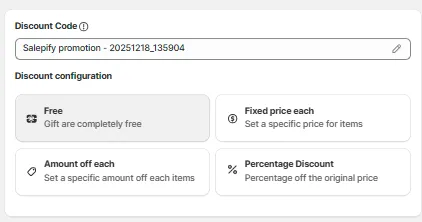
Under Discount settings choose Free, Percentage, Amount off each, or Fixed price per product.
Use cases
Reward baskets of three or more items from a category.
Take 50 percent off the cheapest item in a bundle of sale items.
Run a reward without holding a separate gift product.
FAQ
No. The discount applies to an item already in the cart.
Yes. Discount types include Free, Percentage, Amount off each, and Fixed price per product.
No. The app notes the two cannot be used together.
Related features
Free gifts, BOGO, bundles and progress bars. Every offer type, on a free plan to start.